Assigned Tasks View
Journey Manager (JM) The transaction engine for the platform. | System Manager / DevOps | 22.04 This feature was introduced in 22.04.
Journey Manager allows you to create and view tasks, including an option to search for associated transactions which helps you to identify and manage tasks.You can interact with these transactions on the Assigned Tasks view. This view appears on the Operations portal's List screen. For general information about the List screen, see Manage Transactions.
The Assigned Tasks view is the same as the Operations > Assigned Tasks menu item in the Journey Manager console. For more information about this menu item, see View Assigned Tasks.
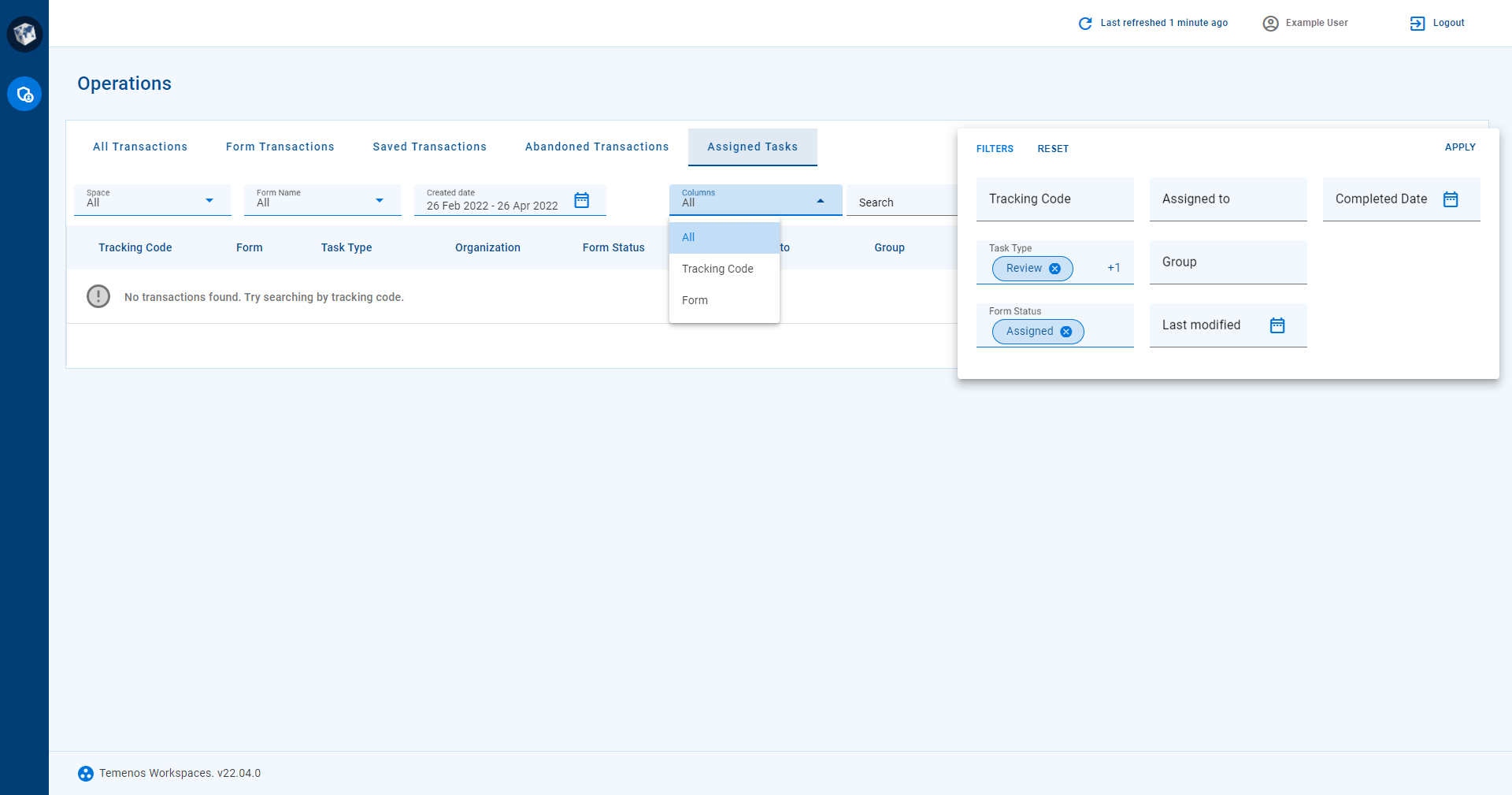
By default, the Assigned Tasks view shows transactions that satisfy the following conditions.
formStatusis Assigned.
Item List
The item list in this view includes the following fields.
- Tracking Code
-
A transaction identifier, globally unique in your Journey Manager database. For more information about tracking codes, see Configure Receipt Numbers and Tracking Codes.
- Form
-
The name of a Maestro form. For more information about forms, see Maestro Forms.
- Task Type
-
A transaction task type. For more information about task types, see Tasks Overview.
- Organization
-
A business entity or part thereof, such as a company, government department, or product group. For more information about organizations, see Introduction to Organizations and Organizations Overview.
- Form Status
-
The status of a form transaction. For more information about form status, see Transaction Support Search.
- Assigned To
-
The user or user group that a task is assigned to. For more information about task assignment, see Tasks Overview.
- Group
-
A form group, controlling access to the form. For more information about form groups, see Groups Overview.
- Created On
-
When the transaction was created.
- Last Modified
-
When the transaction was last modified.
- Completed Date
-
When the transaction was completed.
Filter
View filters targeting the following item list fields are available for this view. To learn more about the targeted fields, see the previous section. For each view filter, the component type and valid values are described.
- Tracking Code
-
A text field expecting an alphanumeric tracking code value. Input is not validated.
- Task Type
-
A multi-select chip group containing one or more task type values. Valid values are: Form*, Review*. Task Type filter values marked with an asterisk (*) are selected by default in this view.
- Form Status
-
A multi-select chip group containing one or more form status values. Valid values are: Abandoned*, Assigned*, Completed*, Expired*, Opened, Saved*, Submitted*. Form Status filter values marked with an asterisk (*) are selected by default in this view.
- Assigned To
-
A text field expecting the name of a user or user group. Input is not validated.
- Group
-
A text field expecting the name of a form group. Input is not validated.
- Last Modified
-
A date range composed of a From Date and a To Date in chronological order. Valid values for From Date and To Date are in the range 1 Jan 1900 to 31 Dec 2100.
- Completed Date
-
A date range composed of a From Date and a To Date in chronological order. Valid values for From Date and To Date are in the range 1 Jan 1900 to 31 Dec 2100.