Improve Page Load Time of Maestro Forms
MaestroThe UI design product. |
Form Builder  Template Designer | 18.11
This feature was updated in 18.11.
Template Designer | 18.11
This feature was updated in 18.11.
Studies have shown that page load time has a significant impact on conversion rates. In short, the faster your forms load, the less likely they will suffer from high rates of abandonment. As a result, the performance of your forms has a direct impact on your organization's bottom-line.
There are a few simple methods for improving page load times by analyzing your forms in their current state and by enabling or tweaking some product features:
- Check Form Rendering Metrics
- Check Form Resource Summary
- Analyze Page Load Time
- Enable Static Content Externalization
- Enable GZIP Compression
- Load Reference Data via Dynamic Data Calls
- Use Correct Image Formats
- Compress Images
- Perform Load Testing
Let's look at each of these approaches in more detail.
Check Form Rendering Metrics
If you already have forms in development or production environments, Manager provides you with form rendering metrics to see how forms are performing.
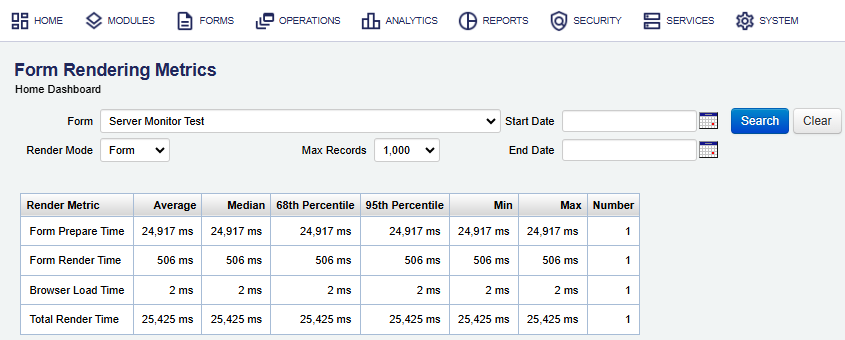
This should help you ping point the forms that have the slowest load times, so you can do something about it.
Check Form Resource Summary
Now, when you know which forms are loaded slowest, you can open each form in Maestro to check what resources it uses. This is a quick way to identify which parts of a form might be causing performance issues.
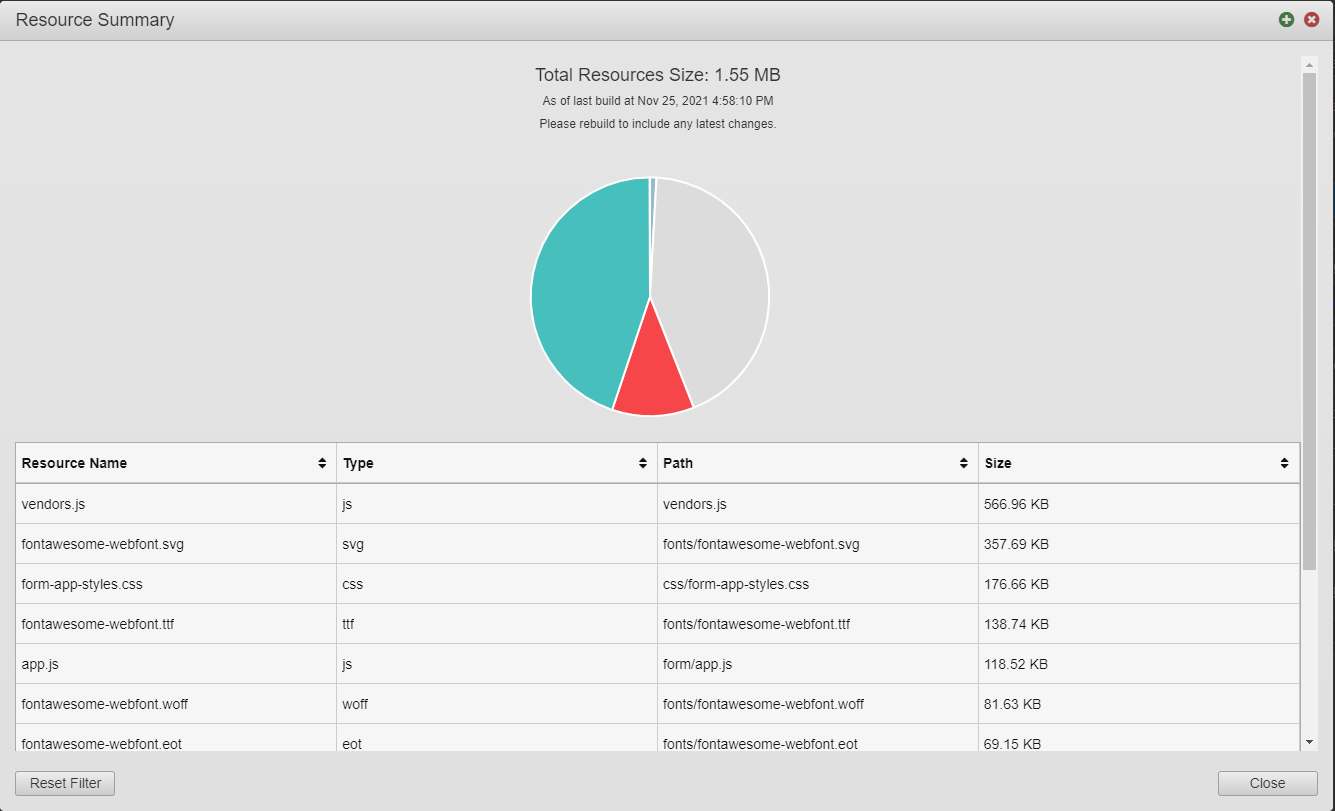
You can sort by the Size column to identify the largest resources. For more information, see Form Resource Summary.
Analyze Page Load Time
There's a number of tools available for analyzing the page load time of web pages. These are useful for understanding how different users might experience your forms.
Here's a few of the most popular options:
Each tool offers different metrics and ways of displaying those metrics, so it's worth running your forms through all of them to gain the most insight into their performance. In particular, look for large resources, unnecessary resources, resources that could be combined into a single HTTP request, and resources that aren't loading.
Enable Static Content Externalization
Manager comes with the Static Content Externalization feature allowing to serve most of a form's content via content distribution networks. As a result, content is delivered to the end-user in parallel and from servers closer to where they live. In some cases, enabling this feature has immediately t page load times in half.
Enable GZIP Compression
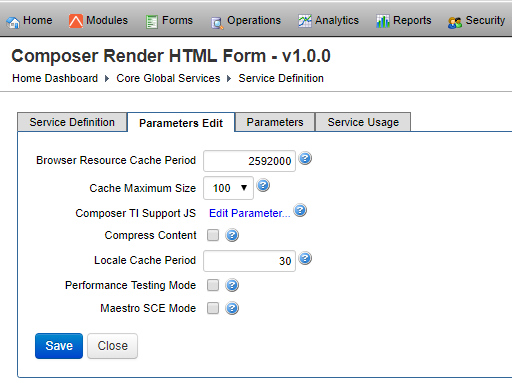
Another option worth enabling is the Compress Content option, which uses GZIP compression to reduce the size of HTML, CSS, and JavaScript before it's delivered to users. This compression happens server-side, which means it does place more load on the server, but the significant reduction in page load time makes it a worthwhile trade-off. For more information, see Composer Render HTML Form Service.
Load Reference Data via Dynamic Data Calls
Forms often rely on a significant amount of reference data, such as a list of countries or states. Depending on the type of form you're creating, you might be able to load some of this data when the form loads, but consider the following scenario:
- A user arrives at the form.
- They select their country from a dropdown.
- A different dropdown is populated with states from the user's country.
In this situation, not only would all of the countries need to be loaded as the form renders, but also all of the states for all of the countries. If there are other fields that rely on reference data, such as cities, a very large amount of data will need to be loaded upfront.
To reduce the impact of this, use dynamic data calls to load the relevant subsets of reference data after the form loads. You could, for instance, load a list of a country's states after the user has selected the country they live in. The time it takes for this additional HTTP request to complete will be significantly shorter than loading all of the data upfront.
Use Correct Image Formats
Image formats are designed for different purposes. If you use a format for the correct purpose, image sizes will be as small as possible while retaining their quality. If you use an incorrect format, the end-user will wonder why low-quality images are taking so long to render.
Here's a quick reference to understand when certain formats are appropriate:
| Format | When To Use |
|---|---|
|
JPEG |
Images with large color palettes, such as photos. |
|
PNG |
Web graphics with a small color palette or transparency. |
|
GIF |
Animated images. |
Other formats are available, such as Google's WebP format, but the formats in the above table are the easiest to implement without having to consider browser compatibility.
Compress Images
To further reduce the file size of images, use a compression tool such as ImageOptim.
Image compression tools work by removing unnecessary meta-data embedded in image files and running clever algorithms that imperceptibly lower the quality of images while drastically reducing their file sizes.
You can use ImageOptim via the command line, allowing you to integrate image optimization into your development workflow.
Perform Load Testing
Analyzing the page load time of a form is an excellent way to establish a baseline of your form's performance, but it doesn't necessarily indicate how your form will stand-up under real-world use. Once a form (and the server on which it's hosted) is placed under the load of simultaneous users, its performance can degrade.
To prepare for this, consider using a load-testing service:
These services direct a large amount of traffic to a server in a small amount of time, allowing you to determine how your form will perform under heavy use. This makes it easier to discover bottlenecks that need to be accounted for before putting a form in front of customers.
Conclusion
It's rare for any web page to load as fast as it can possibly load. There is almost always something else that can be done to save a few extra milliseconds here and there. With this in mind, a priority should be to monitor the performance of your forms using the tools listed in this topic. As the tools evolve, technologies improve, and best practices shift, this ongoing awareness will pay dividends.
Next, learn about the Maestro form accessibility.