Hierarchy and Isolation
Code Libraries have three levels of hierarchy depending on their configuration. This hierarchy enables code isolation and security across a single instance of Journey Manager (JM) and across various solution version releases.
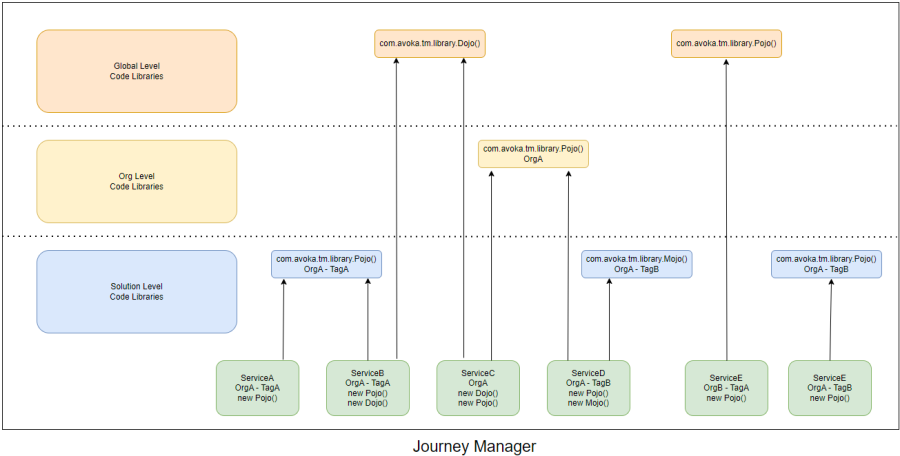
- Global Level - Use for enterprise-wide utilities, common data formatters, shared integration helpers used across all organizations.
- Organization (Org) Level - Use for organization-specific business rules, data models specific to one business unit, integration adapters for org-specific systems.
- Org/Tag Level - Use for solution version-specific implementations, controlled rollout of library updates, running multiple solution versions simultaneously. The layer allows complete Code Library isolation to specific Groovy service definitions.
Configure
Configure the hierarchy either via the SDK project or directly within the Journey Manager console by navigating to the Code Library's Service Definition tab.
| Hierarchy Level | Configuration | Accessibility |
|---|---|---|
| Global Level | No Org or Tag | Any Groovy script within JM instance |
| Org Level | Org assigned | Only Groovy services with same Org |
| Org/Tag Level | Org and Tag assigned | Only Groovy scripts with same Org and Tag |
Tags vs Versions
Code Libraries use two separate identifiers:
| Aspect | Maven Version | Code Library Tag |
|---|---|---|
| Purpose | Dependency management | Runtime isolation in JM |
| Configured In | pom.xml <version> | SDK project or JM console |
| Naming Rules | Any string (e.g., 1.0.0) | Java package naming: letters, numbers, underscores only |
| Valid Examples | 1.0.0, 2.1.5-SNAPSHOT | v1_0, v2, release_2024 |
| Invalid Examples | N/A | 1.0.0, v1.2.3, release-2024 (dots/hyphens not allowed) |
Tag Behavior by Hierarchy Level
- Global - Tags are ignored.
- Org - Tags are optional.
- Org/Tag - Tags enable multiple versions per Org.
Resolution Order
Through this hierarchy, JM allows the same Code Library package/class name to be defined at multiple levels within the one JVM. When a Code Library is instantiated within a Groovy script, JM searches in this order:
- First: Org/Tag Level (most specific)
- Second: Org Level (organization-specific)
- Third: Global Level (instance-wide)
Code Libraries at lower levels (more specific) take precedence over higher levels (more general).
Multi-Tenancy Benefits
Within a multi-tenanted environment where Global Level Code Libraries have been implemented and referenced by multiple Orgs, you can make a change to a single Code Library and have all Orgs receive it at once. Alternatively, use Org/Tag levels to isolate changes to specific solutions or versions.