Long Running Service Pattern
Journey Manager (JM)
The transaction engine for the platform. |
Form Builder  Platform Developer | All versions
This feature is related to all versions.
Platform Developer | All versions
This feature is related to all versions.
Sometimes you may need to invoke a Dynamic Data Service from a form, and you know that it may take some time. Perhaps there is a back-end service that is slow, or perhaps you are calling several different services in order to get your answer.
It might look something like this:
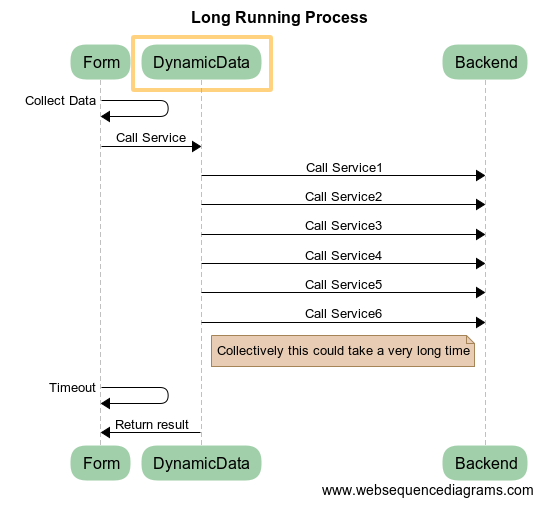
There is two problems with this:
- Both Maestro and the Transact Manager web server (usually Apache) have a built-in service timeouts. If you exceed this timeout, you will receive an error in your application. This means that you will never actually receive a result.
- While the service is running, the user has no feedback on what is going on.
One solution would be to increase the timeouts. However, the timeouts are there for a reason - they are there to protect the application server from having a large number of long-running HTTP connections open. Too many open connections, and the server will eventually run out of resources.
Here are two patterns that may be helpful to work around this problem.
Progress Polling
One of the useful things about the web (and Manager) is that services are all asynchronous. So we can modify the above sequence to look something like this:
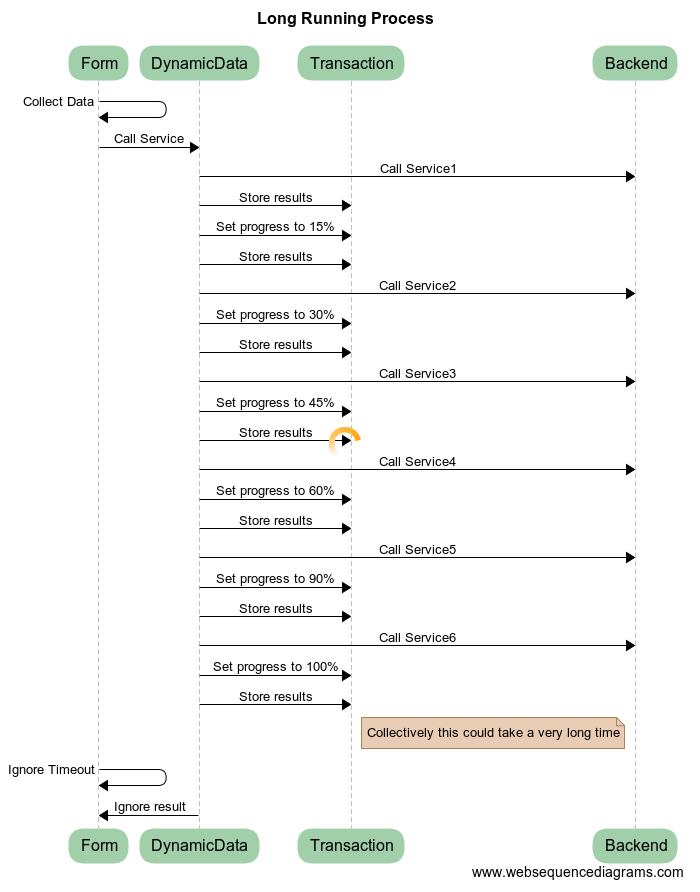
We've basically made three changes:
- Update a transaction property to represent the percentage progress of the long running process.
- Store the intermediate results of the service calls in a transaction property (or multiple properties).
- Ignore both the timeout and the result of the initial Dynamic Data Service call.
Then, in parallel, we will implement another Dynamic Data Service call. This will be on a timer, and will call the Manager server periodically.
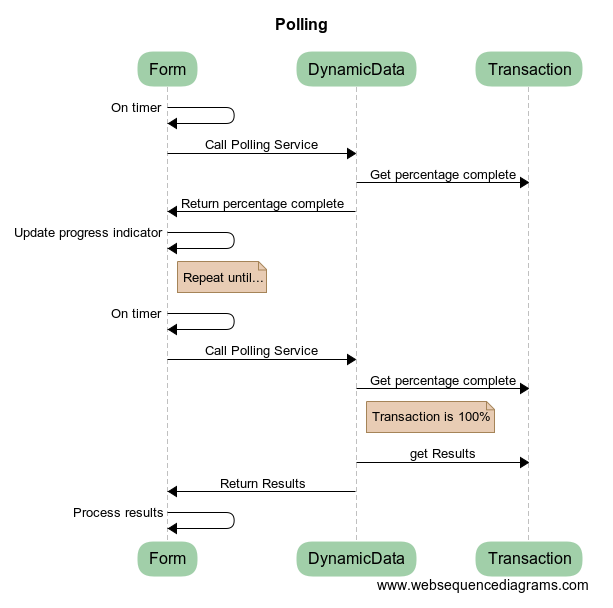
The form will call the Polling Service periodically.
The polling service will check the percentage complete, and either;
- Return the percentage complete, so that the form can update the progress meter (or similar) (This is shown in the top half of the diagram above.)
- If the process is complete, return the results, so the form can use them. (This is shown in the bottom half of the diagram above.)
This solves both problems.
Blind State Machine
Another way to solve this is to use a blind state machine.
This breaks up the sequence of execution, but does so in a way that the Form is unaware of the details or logic that is occurring on the server. This helps to make sure that the form cannot be compromised by a malicious user.
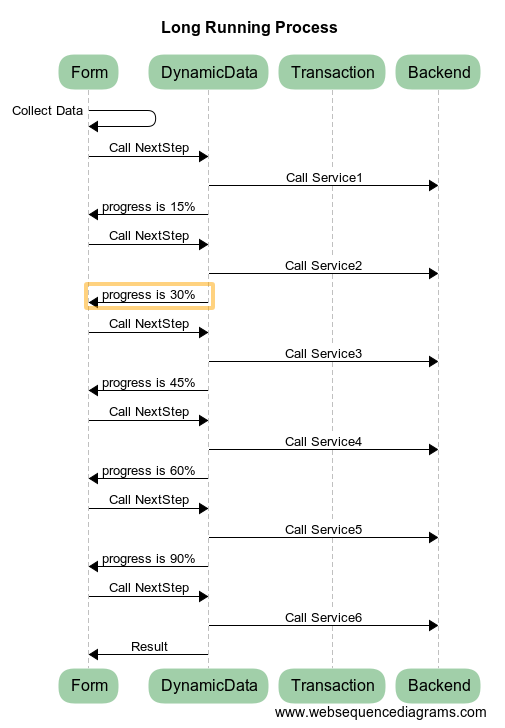
In this pattern:
- We break up the calls to ensure that none of them exceeds the timeout value.
- In the same way as the above solution, we are giving feedback to the form that allows it to update a progress meter.
- We are careful not to expose the internals of the state machine, or how its logic works. All we are doing is calling "NextStep" until we get back a result rather than a progress indicator.
Enterprise Service Bus
A third approach is to use an Enterprise Service Bus or similar architecture. In this case, we would use message queues or similar patterns to "kick off" a long running process. We would then using the polling pattern to discover when the process is complete.
Conclusion
Both the patterns described should be fairly easy to implement, and solve the required problem. The progress polling pattern is arguably superior, because it completely hides the server implementation from the Form.
Next, learn how to view Transact functions.