Link Component
MaestroThe UI design product. | Form Builder | All versions This feature is related to all versions.
Maestro provides the Link component that allows you to add a text link to a form. This can be used to redirect users to a URL away from the form, for example to direct users to websites that contain terms and conditions or privacy statements. However, when users navigate away from the form, there is always a chance that they won’t return, so use this component with this information in mind.
To configure the Link component on a form:
- Open a Maestro form.
- Click the Palette tab and expand Display Fields.
- Select Link and drag and drop it on the form.
- Click the Properties tab.
- Edit the following Link properties:
- Label - the text that displays on the form, which users select to follow the link’s URL.
- Link URL - the URL for the link.
- Link Target - defines where the link opens when users click on it. The options are:
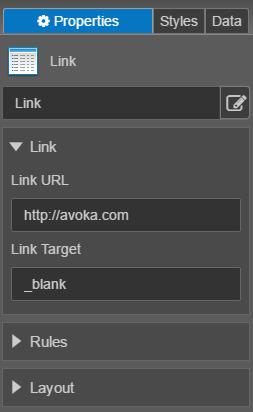
- _blank- Opens the linked document in a new window or tab. This is the default.
- _self -Opens the linked document in the same frame as it was clicked.
- _parent - Opens the linked document in the parent frame.
- _top - Opens the linked document in the full body of the window.
- Click Save.
- Click Build and Render Form to see how this rule is displayed when the form is built and rendered.