Invoke Core Services Pattern
Journey Manager (JM)
The transaction engine for the platform. |
Form Builder  Platform Developer | All versions
This feature is related to all versions.
Platform Developer | All versions
This feature is related to all versions.
Fluent SDK provides great ability to execute Fluent APIs efficiently. Most of your project requirements should be served through Fluent APIs. However, you may find a situation where some of the operations that you were able to do earlier (prior Transact 17.10) using Core APIs are no longer supported by Fluent API. You should reach out to product team to discuss these requirements and create a request to add the support in Fluent API in future release. This may take some time due to product release cycle and your project cannot wait till then. This article explains the design pattern you should use to invoke Core APIs in your project and eventually replace when product team delivers that functionality with new release.
Let's take a use case for explaining this design pattern. In this example your project has a fluent service A needs to execute certain operations such as updating "Job Status" that is only available through Core API (at the time of writing this article). Fluent service does not allow you to import core classes. So you have to create a core groovy service by invoking "svc-scaffold-legacy" ant target in your sdk.
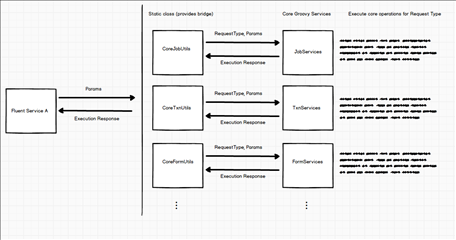
As illustrated in the diagram below, Fluent service may pass parameters that is required by core service to execute core operations. I have split core operations by categories such as Job, Transaction, Form etc as you may need certain operations under each category which are not available in fluent API yet.
Step 1
In this example below, I have created three static classes (which will be added dependencies in Fluent service definition). You can add more static classes as you need for other categories of Transact platform.
- CoreJobUtils - Provides all helper methods for collaboration job object (code is in Step 5)
- CoreTxnUtils - Provides all helper methods for Transaction object
- CoreFormUtils - Provides all helper methods for Form object.
Create these core services under projects "utils > core" package for better isolation. e.g. com.avoka.project.utils.core
Step 2
For consistency we will need to create a generic POJO that can be used as a wrapper for the response from core service. Let's called it "ExecutionResponse" groovy class and put that under "vos" package.
package com.avoka.cnb.cnb1.vos;

public class ExecutionResponse {

    public static final String STATUS_SUCCESS = "Success";
    public static final String STATUS_ERROR = "Error";

    private String status;
    private String errorMessage;
    private String serviceResponse;

    public ExecutionResponse() {}

    public String getStatus() {
        return status;
    }

    public void setStatus(String status) {
        this.status = status;
    }

    public String getErrorMessage() {
        return errorMessage;
    }

    public void setErrorMessage(String errorMessage) {
        this.errorMessage = errorMessage;
    }

    String getServiceResponse() {
        return serviceResponse
    }

    void setServiceResponse(String serviceResponse) {
        this.serviceResponse = serviceResponse
    }
}
Step 3
Fluent service needs to include required static class and ExecutionResponse in service definition so that it's available during execution.
{
	"name": "groovyScript",
	"filePath": "CNBProductSelectorPreprocessorAng.groovy",
	"filelncludes":	[
		"com/avoka/cnb/cnbl/utils/core/CoreJobUtils.groovy", "com/avoka/cnb/cnbl/vos/ExecutionResponse.groovy"
	]
}
Step 4:
Create a core service by executing "svc-scaffold-legacy" target. Let's call it "CNB Job Services". This single groovy service will execute all core API operations by looking at "RequestType" request parameter which will be passed by Utils class in Step 4. This way we dont need to create multiple core groovy services for each missing operation. This service is responsible for creating "ExecutionResponse" object with relevant attribute values such as Status, error message and service's raw response. This will be then forwarded back to Utils class and eventually back to caller which is Fluent service.
package com.avoka.cnb.cnb1.services.core.job

import com.avoka.cnb.cnb1.vos.ExecutionResponse;

/* Generic Groovy script to perform all Job related operations that currently not supported by Fluent

   Script parameters include:
       parameters : Map<String, String>
       serviceDefinition : com.avoka.fc.core.entity.ServiceDefinition
       serviceParameters : Map<String, String>
       args : List<String>
       job : com.avoka.fc.core.entity.Job
       jobAction : com.avoka.fc.core.entity.JobAction

   Script return:
       script result
*/
import com.avoka.core.groovy.GroovyLogger as logger
import com.avoka.fc.core.dao.DaoFactory
import com.avoka.fc.core.service.job.impl.JobControllerService
import com.avoka.tm.util.Contract

ExecutionResponse executionResponse = new ExecutionResponse();

String status = ""
String errorMessage = ""
String requestType = parameters["RequestType"];
Contract.notNull(requestType, "Request Type");

Map<String, Object> executionParams = parameters["ExecutionParams"];
String jobReferenceNumber = executionParams["JobReferenceNumber"];

def requestedJob = DaoFactory.getJobDao().getJobForReferenceNumber(jobReferenceNumber);
if(requestedJob) {
    if (requestType == "STATUS_UPDATE") {
        String newStatus = executionParams["JobStatus"];
        requestedJob.setStatus(newStatus);
        new JobControllerService().commitChanges();
        status = ExecutionResponse.STATUS_SUCCESS;
    }
} else {
    status = ExecutionResponse.STATUS_ERROR;
    errorMessage = "Unable to find a job with reference number ${jobReferenceNumber}";
}

executionResponse.setStatus(status);
executionResponse.setErrorMessage(errorMessage);

return executionResponse
Step 5
Add a static method in "CoreJobUtils.groovy" class to invoke core service to update Job status. This service is responsible for updating job status and return back "ExecutionResponse" object with execution status.
packagecom.avoka.cnb.cnb1.utils.core;
importcom.avoka.cnb.cnb1.vos.ExecutionResponse;
importcom.avoka.tm.svc.GroovyServiceInvoker;
importcom.avoka.tm.vo.SvcDef;
publicclassCoreJobUtils {
    /**
     * Updates the job status
     * @param svcDef Service that requests this activity to be added to the package lifecycle
     * @param jobReferenceNumber Collaboration Job Reference Number
     * @param jobStatus Job Status
     * @return ExecutionResponse object contains status and error message
     */
    publicstaticExecutionResponse updateJobStatus (SvcDef svcDef, String jobReferenceNumber, String jobStatus) {
        Map<String, Object> reqParams = newHashMap<>();
        reqParams.put("RequestType", "STATUS_UPDATE");
        Map<String, Object> executionParams = newHashMap<>();
        executionParams.put("JobReferenceNumber", jobReferenceNumber);
        executionParams.put("JobStatus", jobStatus);
        reqParams.put("ExecutionParams", executionParams);
        Object activityResponseData = newGroovyServiceInvoker()
                .setServiceName("CNB Job Services")
                .setClientCode(svcDef.clientCode)
                .invoke(reqParams);
        return(ExecutionResponse) activityResponseData;
    }
}
Step 6
Now, let's invoke the utility method in the Fluent service itself that allows us to update job status by invoking actual core groovy service.
ExecutionResponse executionResponse = CoreJobUtils.updateJobStatus(svcDef, job.referenceNumber, Job.STATUS_CANCELLED);
if(executionResponse.status == ExecutionResponse.STATUS_SUCCESS) {
    logger.info "Cancelling job "+ job.referenceNumber + " due to edit package event"
} else{
    logger.error "There is a problem with cancelling job ${job.referenceNumber}. Error: ${executionResponse.errorMessage}";
}
Benefits
- Provides a controlled approach to isolate core and fluent services usage in your project.
- Utility classes lists all missing methods that eventually you need a support in Fluent API. This can also help you to find a usage of those methods in your project to understand the impact of a change. If you directly invoking core groovy service from fluent service, you have to rely on text search for service name in your project which can be messy in a big complex project.
- As we get fluent API support with an upgrade, you can find all usages and replace the code with Fluent API easily. This can also help you understand which area you have to focus on testing in order to make sure things work as expected. You can then delete that method from Util class. Ideally we don't want any methods in that class as support should be through Fluent.
- Fluent SDK combines all file includes in service definition into a single file during application deploy to Manager. Splitting into multiple Utils class provides less footprint in actual service output. Not something you need to worry about but still better to have less duplicate and lengthy code across file which provides better readability if someone viewing from Manager admin console.
Next, learn more about the server-side persistence pattern.