
This article describes the page content, raw code rendering issue, observed after upgrading Form Spaces, along with its resolution and supporting steps.
Applicable To
- Product/Service: Journey Manager (JM)
- Form Spaces (all versions)
Problem
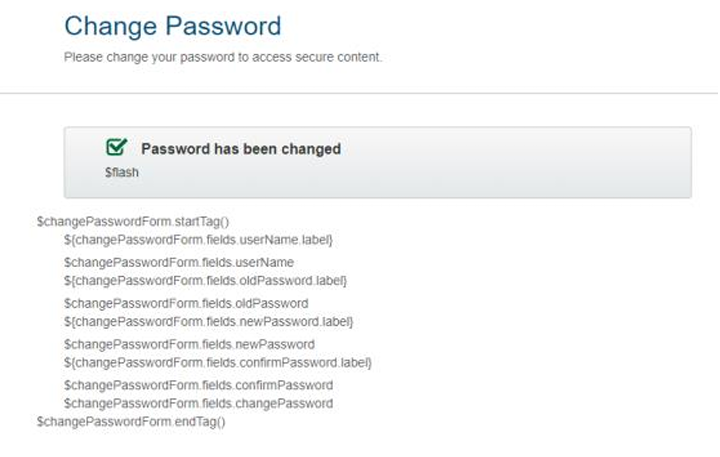
After a Form Space upgrade, sometimes certain HTM-based pages, for example Change Password, Forgot Password, and Login, displayed raw page content code instead of rendering correctly. This resulted in broken UI for users accessing these screens.
Resolution
After a Formspace upgrade, the page content code on some pages may change automatically. To resolve this issue, revert the affected pages to their base versions by following these steps.
- Navigate to Home Dashboard → Formspace.
- Identify the affected page (e.g.,Index, Not Authorized, Change Password, etc.)
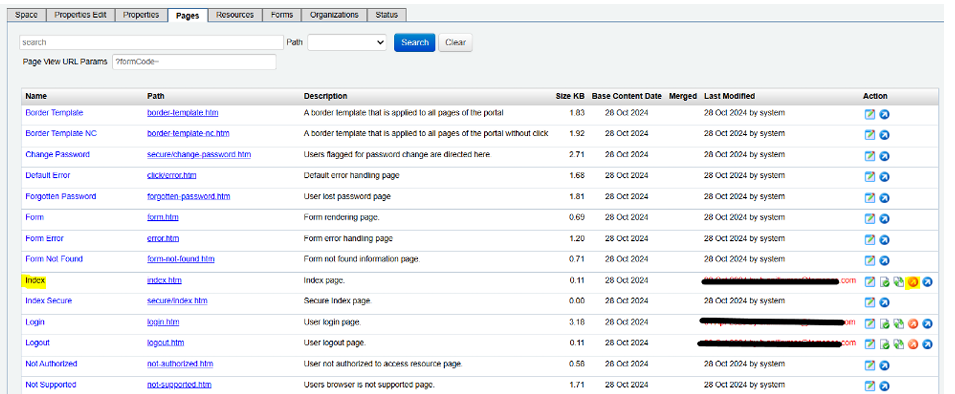
- Click the arrow next to the page (highlighted in orange arrow in the UI).
- Compare the modified page with the base page.
- If you observe any modifications that were not made by you, click on the Restore Base Content just right to the orange arrow.