
This article explains how to increase the file upload or attachment size limit in Journey Manager (JM). By default, JM limits file uploads to 50 MB. This guide provides steps for both Cloud-hosted and On-Premises clients to safely increase the limit.
Applicable To
- Product/Service: Journey Manager (JM)
- Module/Component: File Upload / Attachment Configuration
- Versions: All supported JM versions
Prerequisites
- Administrative access to JM server (for on-premises clients).
- Permission to edit and back up configuration files.
- Ability to restart JM and related services.
Problem
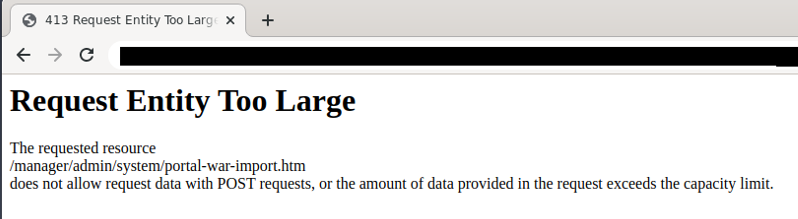
By default, Journey Manager restricts the maximum upload size for form file attachments to 50 MB. When a file exceeding this limit is uploaded, the following error occurs:
Resolution
Cloud Clients
For Cloud-hosted environments, configuration changes to increase the upload limit are handled by the Temenos Cloud team.
Please raise a Temenos support ticket requesting an increase to file upload size limit.
On-Premises Clients
For On-Premises installations, follow these steps to increase the JM upload limit (e.g., to 150 MB). Note: Ensure configuration files are backed up before modifying.
Step 1: Update 'standalone.xml'
File path: '[avoka-transact-manager-dirpath, e.g.,/data/avoka/transact/manager/server/standalone/configuration/standalone.xml]'
Locate and modify the following entries to update the 'max-post-size' value:
'max-post-size=0' can be used for unlimited size.
...
<ajp-listener name="ajp" socket-binding="ajp" max-post-size="157286400" max-header-size="16384" scheme="https"/><http-listener name="default" socket-binding="http" max-post-size="157286400" max-header-size="16384"/>
...
Restart the txmanager service after saving changes.
Step 2: Update Apache 'mod_security.conf' (if applicable)
File path: '/etc/httpd/conf.d/mod_security.conf'
Comment out the old limits and add new values as shown below:
#SecRequestBodyLimit 52428800
#SecRequestBodyNoFilesLimit 52428800
#SecRequestBodyInMemoryLimit 52428800
# Increase to 150 MB
SecRequestBodyLimit 157286400
SecRequestBodyNoFilesLimit 157286400
SecRequestBodyInMemoryLimit 157286400
Restart the httpd service.
Step 3: Update ClamAV Configuration (if used)
File path: '/etc/clamd.d/clamd.conf'
Modify the following lines to increase scanning limits:
#AvokaTransact
#StreamMaxLength 50M
#MaxFileSize 50M
# Updated to 150M
StreamMaxLength 150M
MaxFileSize 150M
Restart the service using: 'sudo systemctl restart
Step 4: Repeat on All Portal Nodes (if applicable)
If multiple JM portal nodes are configured, apply the same configuration on each node.
Reference Conversion: 150 MB = 157,286,400 bytes
Note: Restart the following services after all configuration updates:
- txmanager
- httpd
- clamd