
This article explains the issue encountered with iText PDF libraries in Journey Manager (JM) after upgrading to version 21.05 or later. It provides resolution steps for both cloud-hosted and on-premises clients to restore PDF receipt generation functionality.
Applicable To
- Product/Service: Journey Manager (JM)
- Module/Component: PDF Receipt Generation (iText)
- Versions: JM 21.05 and later
Prerequisites
- Access to the JM server or Temenos support portal.
- Knowledge of deploying or updating third-party libraries.
- Valid iText license (for new customers).
Problem
After upgrading Journey Manager to version 21.05 or later, PDF receipt generation fails with missing iText library classes. The following error appears:
java.util.concurrent.ExecutionException:org.codehaus.groovy.control.MultipleCompilationErrorsException: startup failed:
Script1.groovy: 30: unable to resolve class com.itextpdf.text.BaseColor@ line 30, column 1. import com.itextpdf.text.BaseColor ^Script1.groovy: 31: unable to resolve class com.itextpdf.text.Chunk@ line 31, column 1. import com.itextpdf.text.Chunk
Steps to Reproduce
- Upgrade Journey Manager to version 21.05 or later.
- Execute or trigger a service that uses iText for PDF generation.
- Observe the compilation errors indicating unresolved iText classes.
Resolution
Starting from JM 21.05, the iText third-party library is no longer distributed with the JM installer. The resolution depends on the deployment type.
Cloud Clients
- Raise a Temenos Support Request to verify your client environment’s current configuration.
- For existing clients – Temenos will provision the required iText libraries on the JM server.
- For new clients – Purchase an iText license key from iText Software and share it with Temenos. Temenos will configure the license details on the JM server.
On-Premises Clients
If you already possess a valid iText license or the library files, follow the steps below to deploy and configure them:
- Unzip the itext-jars.zip package.
- Copy all .jar and .xml files to the following directory (or your equivalent path): /data/avoka/transact/manager/server/modules/com/itext/main/
- Restart the txmanager service or the entire server.
Verification
After deployment, confirm that iText libraries are functioning correctly:
- Execute the provided verification script(attached snippet) in JM → Services → Groovy Console.
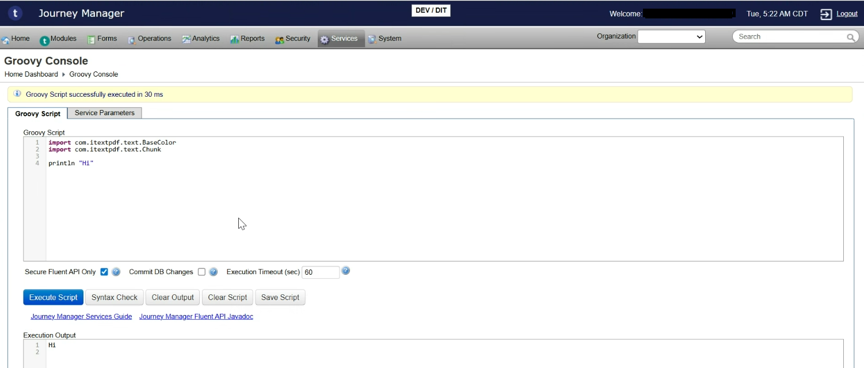
- If the output does not include any unable to resolve class com.itextpdf.text.* errors, the deployment was successful.
References
https://journey.temenos.com/docs/Manager/ManagerLibraries.htm