This article explains the issue where the Salesforce Form Space offline.htm page fails to load in Journey Manager (JM) versions 21.11 and 22.04, and provides the cause and respective resolutions for Cloud-hosted and On-Premises clients.
Applicable To
- Product/Service: Journey Manager (JM)
- Module/Component: Salesforce Form Space
- Versions: 21.11, 22.04
Prerequisites
- Administrative access to JM server (for on-premises clients).
- Access to Salesforce WAR file.
- Basic knowledge of WAR file deployment.
Problem
After upgrading to JM 21.11 or 22.04, the Salesforce Form Space page offline.htm is not working and throws the error 'ApplicationException: com.avoka.fc.portal.render.ErrorPageRender: Page template could not be found'.
When accessing the offline page, continuous error logs are generated until the page is closed.
|
Transact Error Log
|
|
|
| Error ID |
24 |
|
|
| Time |
Sat Oct 21 02:23:44 IST 2023 |
|
|
| Type |
Form Render |
|
|
| Name |
com.avoka.fc.portal.render.ErrorPageRender |
|
|
| Message |
com.avoka.fc.portal.render.ErrorPageRender |
|
|
| User Message |
Page template could not be found |
|
|
| Context |
Rendering page Form Errorfor portal Salesforce |
|
|
| Space / Module |
Salesforce |
|
|
| Request |
GET http://localhost:9080/sfdc/error.htm?entityId=23 |
|
|
| IP Address |
127.0.0.1 |
|
|
| User Agent |
Mozilla/5.0 (Windows NT 10.0; Win64; x64) AppleWebKit/537.36 (KHTML, like Gecko) Chrome/118.0.0.0 Safari/537.36 |
|
|
|
|
|
|
Environment Name
|
Test Environment |
|
|
| License Name |
This email address is being protected from spambots. You need JavaScript enabled to view it. |
|
|
| TM Version |
21.11.2 |
|
|
| Journey Manager |
http://localhost:9080/manager/ |
|
|
| Database Type |
mysql |
|
|
| Deployment Mode |
onprem |
|
|
| Java Version |
11.0.11 |
|
|
| Operating System |
Windows 10 / 10.0 |
|
|
| Time Zone |
Asia/Calcutta |
|
|
| Error Stack Trace |
ApplicationException: com.avoka.fc.portal.render.ErrorPageRender: Page template could not be found
at This email address is being protected from spambots. You need JavaScript enabled to view it..2//com.avoka.fc.portal.render.PageRender.renderPageInstance(PageRender.java:421)
at This email address is being protected from spambots. You need JavaScript enabled to view it..2//com.avoka.fc.portal.render.ErrorPageRender.renderPageInstance(ErrorPageRender.java:102)
at This email address is being protected from spambots. You need JavaScript enabled to view it..2//com.avoka.fc.portal.render.PageRender.renderPage(PageRender.java:257)
at This email address is being protected from spambots. You need JavaScript enabled to view it..2//com.avoka.fc.portal.servlet.PageServlet.executeRequest(PageServlet.java:63)
at This email address is being protected from spambots. You need JavaScript enabled to view it..2//com.avoka.fc.core.servlet.BaseServlet.handleRequest(BaseServlet.java:116)
at This email address is being protected from spambots. You need JavaScript enabled to view it..2//com.avoka.fc.core.servlet.BaseServlet.doGet(BaseServlet.java:97)
at This email address is being protected from spambots. You need JavaScript enabled to view it.//javax.servlet.http.HttpServlet.service(HttpServlet.java:503)
at This email address is being protected from spambots. You need JavaScript enabled to view it.//javax.servlet.http.HttpServlet.service(HttpServlet.java:590)
at This email address is being protected from spambots. You need JavaScript enabled to view it.//io.undertow.servlet.handlers.ServletHandler.handleRequest(ServletHandler.java:74)
at This email address is being protected from spambots. You need JavaScript enabled to view it.//io.undertow.servlet.handlers.FilterHandler$FilterChainImpl.doFilter(FilterHandler.java:129)
at This email address is being protected from spambots. You need JavaScript enabled to view it..2//com.avoka.fc.core.security.UserAccountFilter.doFilter(UserAccountFilter.java:80)
at This email address is being protected from spambots. You need JavaScript enabled to view it.//io.undertow.servlet.core.ManagedFilter.doFilter(ManagedFilter.java:61)
at This email address is being protected from spambots. You need JavaScript enabled to view it.//io.undertow.servlet.handlers.FilterHandler$FilterChainImpl.doFilter(FilterHandler.java:131)
at This email address is being protected from spambots. You need JavaScript enabled to view it..2//com.avoka.fc.core.servlet.FormNameFilter.doFilter(FormNameFilter.java:99)
at This email address is being protected from spambots. You need JavaScript enabled to view it.//io.undertow.servlet.core.ManagedFilter.doFilter(ManagedFilter.java:61)
at This email address is being protected from spambots. You need JavaScript enabled to view it.//io.undertow.servlet.handlers.FilterHandler$FilterChainImpl.doFilter(FilterHandler.java:131)
at This email address is being protected from spambots. You need JavaScript enabled to view it..2//com.avoka.fc.core.servlet.EntityStatusFilter.doFilter(EntityStatusFilter.java:77)
at This email address is being protected from spambots. You need JavaScript enabled to view it.//io.undertow.servlet.core.ManagedFilter.doFilter(ManagedFilter.java:61)
at This email address is being protected from spambots. You need JavaScript enabled to view it.//io.undertow.servlet.handlers.FilterHandler$FilterChainImpl.doFilter(FilterHandler.java:131)
at This email address is being protected from spambots. You need JavaScript enabled to view it..2//com.avoka.fc.core.servlet.HeaderFilter.doFilter(HeaderFilter.java:124)
at This email address is being protected from spambots. You need JavaScript enabled to view it.//io.undertow.servlet.core.ManagedFilter.doFilter(ManagedFilter.java:61)
at This email address is being protected from spambots. You need JavaScript enabled to view it.//io.undertow.servlet.handlers.FilterHandler$FilterChainImpl.doFilter(FilterHandler.java:131)
at This email address is being protected from spambots. You need JavaScript enabled to view it..2//com.avoka.fc.portal.servlet.SecurityPageFilter.doFilter(SecurityPageFilter.java:164)
at This email address is being protected from spambots. You need JavaScript enabled to view it.//io.undertow.servlet.core.ManagedFilter.doFilter(ManagedFilter.java:61)
at This email address is being protected from spambots. You need JavaScript enabled to view it.//io.undertow.servlet.handlers.FilterHandler$FilterChainImpl.doFilter(FilterHandler.java:131)
at This email address is being protected from spambots. You need JavaScript enabled to view it..2//com.avoka.fc.core.servlet.RequestContextFilter.doFilter(RequestContextFilter.java:87)
at This email address is being protected from spambots. You need JavaScript enabled to view it.//io.undertow.servlet.core.ManagedFilter.doFilter(ManagedFilter.java:61)
at This email address is being protected from spambots. You need JavaScript enabled to view it.//io.undertow.servlet.handlers.FilterHandler$FilterChainImpl.doFilter(FilterHandler.java:131)
at org.springframework.spring//org.springframework.security.web.FilterChainProxy$VirtualFilterChain.doFilter(FilterChainProxy.java:327)
at This email address is being protected from spambots. You need JavaScript enabled to view it..2//com.avoka.tm.security.CsrfHeaderFilter.doFilterInternal(CsrfHeaderFilter.java:35)
at org.springframework.spring//org.springframework.web.filter.OncePerRequestFilter.doFilter(OncePerRequestFilter.java:119)
at org.springframework.spring//org.springframework.security.web.FilterChainProxy$VirtualFilterChain.doFilter(FilterChainProxy.java:336)
at org.springframework.spring//org.springframework.security.web.access.intercept.FilterSecurityInterceptor.invoke(FilterSecurityInterceptor.java:115)
at org.springframework.spring//org.springframework.security.web.access.intercept.FilterSecurityInterceptor.doFilter(FilterSecurityInterceptor.java:81)
at org.springframework.spring//org.springframework.security.web.FilterChainProxy$VirtualFilterChain.doFilter(FilterChainProxy.java:336)
at org.springframework.spring//org.springframework.security.web.access.ExceptionTranslationFilter.doFilter(ExceptionTranslationFilter.java:121)
at org.springframework.spring//org.springframework.security.web.access.ExceptionTranslationFilter.doFilter(ExceptionTranslationFilter.java:115)
at org.springframework.spring//org.springframework.security.web.FilterChainProxy$VirtualFilterChain.doFilter(FilterChainProxy.java:336)
at org.springframework.spring//org.springframework.security.web.session.SessionManagementFilter.doFilter(SessionManagementFilter.java:126)
at org.springframework.spring//org.springframework.security.web.session.SessionManagementFilter.doFilter(SessionManagementFilter.java:81)
at org.springframework.spring//org.springframework.security.web.FilterChainProxy$VirtualFilterChain.doFilter(FilterChainProxy.java:336)
at org.springframework.spring//org.springframework.security.web.authentication.AnonymousAuthenticationFilter.doFilter(AnonymousAuthenticationFilter.java:105)
at org.springframework.spring//org.springframework.security.web.FilterChainProxy$VirtualFilterChain.doFilter(FilterChainProxy.java:336)
at org.springframework.spring//org.springframework.security.web.servletapi.SecurityContextHolderAwareRequestFilter.doFilter(SecurityContextHolderAwareRequestFilter.java:149)
at org.springframework.spring//org.springframework.security.web.FilterChainProxy$VirtualFilterChain.doFilter(FilterChainProxy.java:336)
at org.springframework.spring//org.springframework.security.web.savedrequest.RequestCacheAwareFilter.doFilter(RequestCacheAwareFilter.java:63)
at org.springframework.spring//org.springframework.security.web.FilterChainProxy$VirtualFilterChain.doFilter(FilterChainProxy.java:336)
at org.springframework.spring//org.springframework.security.web.authentication.AbstractAuthenticationProcessingFilter.doFilter(AbstractAuthenticationProcessingFilter.java:218)
at org.springframework.spring//org.springframework.security.web.authentication.AbstractAuthenticationProcessingFilter.doFilter(AbstractAuthenticationProcessingFilter.java:212)
at org.springframework.spring//org.springframework.security.web.FilterChainProxy$VirtualFilterChain.doFilter(FilterChainProxy.java:336)
at This email address is being protected from spambots. You need JavaScript enabled to view it..2//com.avoka.fc.core.security.SSOAuthenticationFilter.doFilter(SSOAuthenticationFilter.java:136)
at org.springframework.spring//org.springframework.security.web.FilterChainProxy$VirtualFilterChain.doFilter(FilterChainProxy.java:336)
at org.springframework.spring//org.springframework.security.web.authentication.logout.LogoutFilter.doFilter(LogoutFilter.java:103)
at org.springframework.spring//org.springframework.security.web.authentication.logout.LogoutFilter.doFilter(LogoutFilter.java:89)
at org.springframework.spring//org.springframework.security.web.FilterChainProxy$VirtualFilterChain.doFilter(FilterChainProxy.java:336)
at org.springframework.spring//org.springframework.security.web.header.HeaderWriterFilter.doHeadersAfter(HeaderWriterFilter.java:90)
at org.springframework.spring//org.springframework.security.web.header.HeaderWriterFilter.doFilterInternal(HeaderWriterFilter.java:75)
at org.springframework.spring//org.springframework.web.filter.OncePerRequestFilter.doFilter(OncePerRequestFilter.java:119)
at org.springframework.spring//org.springframework.security.web.FilterChainProxy$VirtualFilterChain.doFilter(FilterChainProxy.java:336)
at org.springframework.spring//org.springframework.security.web.context.SecurityContextPersistenceFilter.doFilter(SecurityContextPersistenceFilter.java:110)
at org.springframework.spring//org.springframework.security.web.context.SecurityContextPersistenceFilter.doFilter(SecurityContextPersistenceFilter.java:80)
at org.springframework.spring//org.springframework.security.web.FilterChainProxy$VirtualFilterChain.doFilter(FilterChainProxy.java:336)
at org.springframework.spring//org.springframework.security.web.context.request.async.WebAsyncManagerIntegrationFilter.doFilterInternal(WebAsyncManagerIntegrationFilter.java:55)
at org.springframework.spring//org.springframework.web.filter.OncePerRequestFilter.doFilter(OncePerRequestFilter.java:119)
at org.springframework.spring//org.springframework.security.web.FilterChainProxy$VirtualFilterChain.doFilter(FilterChainProxy.java:336)
at org.springframework.spring//org.springframework.security.web.FilterChainProxy.doFilterInternal(FilterChainProxy.java:211)
at org.springframework.spring//org.springframework.security.web.FilterChainProxy.doFilter(FilterChainProxy.java:183)
at org.springframework.spring//org.springframework.web.filter.DelegatingFilterProxy.invokeDelegate(DelegatingFilterProxy.java:358)
at org.springframework.spring//org.springframework.web.filter.DelegatingFilterProxy.doFilter(DelegatingFilterProxy.java:271)
at This email address is being protected from spambots. You need JavaScript enabled to view it.//io.undertow.servlet.core.ManagedFilter.doFilter(ManagedFilter.java:61)
at This email address is being protected from spambots. You need JavaScript enabled to view it.//io.undertow.servlet.handlers.FilterHandler$FilterChainImpl.doFilter(FilterHandler.java:131)
at This email address is being protected from spambots. You need JavaScript enabled to view it..2//com.avoka.fc.core.servlet.RequestContextFilter.doFilter(RequestContextFilter.java:87)
at This email address is being protected from spambots. You need JavaScript enabled to view it.//io.undertow.servlet.core.ManagedFilter.doFilter(ManagedFilter.java:61)
at This email address is being protected from spambots. You need JavaScript enabled to view it.//io.undertow.servlet.handlers.FilterHandler$FilterChainImpl.doFilter(FilterHandler.java:131)
at This email address is being protected from spambots. You need JavaScript enabled to view it..2//com.avoka.fc.core.servlet.SysEventFilter.doFilter(SysEventFilter.java:35)
at This email address is being protected from spambots. You need JavaScript enabled to view it.//io.undertow.servlet.core.ManagedFilter.doFilter(ManagedFilter.java:61)
at This email address is being protected from spambots. You need JavaScript enabled to view it.//io.undertow.servlet.handlers.FilterHandler$FilterChainImpl.doFilter(FilterHandler.java:131)
at This email address is being protected from spambots. You need JavaScript enabled to view it..2//com.avoka.fc.core.servlet.DataContextFilter.doFilter(DataContextFilter.java:154)
at This email address is being protected from spambots. You need JavaScript enabled to view it.//io.undertow.servlet.core.ManagedFilter.doFilter(ManagedFilter.java:61)
at This email address is being protected from spambots. You need JavaScript enabled to view it.//io.undertow.servlet.handlers.FilterHandler$FilterChainImpl.doFilter(FilterHandler.java:131)
at This email address is being protected from spambots. You need JavaScript enabled to view it.//io.undertow.servlet.handlers.FilterHandler.handleRequest(FilterHandler.java:84)
at This email address is being protected from spambots. You need JavaScript enabled to view it.//io.undertow.servlet.handlers.security.ServletSecurityRoleHandler.handleRequest(ServletSecurityRoleHandler.java:62)
at This email address is being protected from spambots. You need JavaScript enabled to view it.//io.undertow.servlet.handlers.ServletChain$1.handleRequest(ServletChain.java:68)
at This email address is being protected from spambots. You need JavaScript enabled to view it.//io.undertow.servlet.handlers.ServletDispatchingHandler.handleRequest(ServletDispatchingHandler.java:36)
at This email address is being protected from spambots. You need JavaScript enabled to view it.//org.wildfly.extension.undertow.security.SecurityContextAssociationHandler.handleRequest(SecurityContextAssociationHandler.java:78)
at This email address is being protected from spambots. You need JavaScript enabled to view it.//io.undertow.server.handlers.PredicateHandler.handleRequest(PredicateHandler.java:43)
at This email address is being protected from spambots. You need JavaScript enabled to view it.//io.undertow.servlet.handlers.RedirectDirHandler.handleRequest(RedirectDirHandler.java:68)
at This email address is being protected from spambots. You need JavaScript enabled to view it.//io.undertow.servlet.handlers.security.SSLInformationAssociationHandler.handleRequest(SSLInformationAssociationHandler.java:117)
at This email address is being protected from spambots. You need JavaScript enabled to view it.//io.undertow.servlet.handlers.security.ServletAuthenticationCallHandler.handleRequest(ServletAuthenticationCallHandler.java:57)
at This email address is being protected from spambots. You need JavaScript enabled to view it.//io.undertow.server.handlers.PredicateHandler.handleRequest(PredicateHandler.java:43)
at This email address is being protected from spambots. You need JavaScript enabled to view it.//io.undertow.security.handlers.AuthenticationConstraintHandler.handleRequest(AuthenticationConstraintHandler.java:53)
at This email address is being protected from spambots. You need JavaScript enabled to view it.//io.undertow.security.handlers.AbstractConfidentialityHandler.handleRequest(AbstractConfidentialityHandler.java:46)
at This email address is being protected from spambots. You need JavaScript enabled to view it.//io.undertow.servlet.handlers.security.ServletConfidentialityConstraintHandler.handleRequest(ServletConfidentialityConstraintHandler.java:64)
at This email address is being protected from spambots. You need JavaScript enabled to view it.//io.undertow.servlet.handlers.security.ServletSecurityConstraintHandler.handleRequest(ServletSecurityConstraintHandler.java:59)
at This email address is being protected from spambots. You need JavaScript enabled to view it.//io.undertow.security.handlers.AuthenticationMechanismsHandler.handleRequest(AuthenticationMechanismsHandler.java:60)
at This email address is being protected from spambots. You need JavaScript enabled to view it.//io.undertow.servlet.handlers.security.CachedAuthenticatedSessionHandler.handleRequest(CachedAuthenticatedSessionHandler.java:77)
at This email address is being protected from spambots. You need JavaScript enabled to view it.//io.undertow.security.handlers.NotificationReceiverHandler.handleRequest(NotificationReceiverHandler.java:50)
at This email address is being protected from spambots. You need JavaScript enabled to view it.//io.undertow.security.handlers.AbstractSecurityContextAssociationHandler.handleRequest(AbstractSecurityContextAssociationHandler.java:43)
at This email address is being protected from spambots. You need JavaScript enabled to view it.//io.undertow.server.handlers.PredicateHandler.handleRequest(PredicateHandler.java:43)
at This email address is being protected from spambots. You need JavaScript enabled to view it.//org.wildfly.extension.undertow.security.jacc.JACCContextIdHandler.handleRequest(JACCContextIdHandler.java:61)
at This email address is being protected from spambots. You need JavaScript enabled to view it.//io.undertow.server.handlers.PredicateHandler.handleRequest(PredicateHandler.java:43)
at This email address is being protected from spambots. You need JavaScript enabled to view it.//org.wildfly.extension.undertow.deployment.GlobalRequestControllerHandler.handleRequest(GlobalRequestControllerHandler.java:68)
at This email address is being protected from spambots. You need JavaScript enabled to view it.//io.undertow.servlet.handlers.SendErrorPageHandler.handleRequest(SendErrorPageHandler.java:52)
at This email address is being protected from spambots. You need JavaScript enabled to view it.//io.undertow.server.handlers.PredicateHandler.handleRequest(PredicateHandler.java:43)
at This email address is being protected from spambots. You need JavaScript enabled to view it.//io.undertow.servlet.handlers.ServletInitialHandler.handleFirstRequest(ServletInitialHandler.java:269)
at This email address is being protected from spambots. You need JavaScript enabled to view it.//io.undertow.servlet.handlers.ServletInitialHandler.access$100(ServletInitialHandler.java:78)
at This email address is being protected from spambots. You need JavaScript enabled to view it.//io.undertow.servlet.handlers.ServletInitialHandler$2.call(ServletInitialHandler.java:133)
at This email address is being protected from spambots. You need JavaScript enabled to view it.//io.undertow.servlet.handlers.ServletInitialHandler$2.call(ServletInitialHandler.java:130)
at This email address is being protected from spambots. You need JavaScript enabled to view it.//io.undertow.servlet.core.ServletRequestContextThreadSetupAction$1.call(ServletRequestContextThreadSetupAction.java:48)
at This email address is being protected from spambots. You need JavaScript enabled to view it.//io.undertow.servlet.core.ContextClassLoaderSetupAction$1.call(ContextClassLoaderSetupAction.java:43)
at This email address is being protected from spambots. You need JavaScript enabled to view it.//org.wildfly.extension.undertow.security.SecurityContextThreadSetupAction.lambda$create$0(SecurityContextThreadSetupAction.java:105)
at This email address is being protected from spambots. You need JavaScript enabled to view it.//org.wildfly.extension.undertow.deployment.UndertowDeploymentInfoService$UndertowThreadSetupAction.lambda$create$0(UndertowDeploymentInfoService.java:1535)
at This email address is being protected from spambots. You need JavaScript enabled to view it.//org.wildfly.extension.undertow.deployment.UndertowDeploymentInfoService$UndertowThreadSetupAction.lambda$create$0(UndertowDeploymentInfoService.java:1535)
at This email address is being protected from spambots. You need JavaScript enabled to view it.//org.wildfly.extension.undertow.deployment.UndertowDeploymentInfoService$UndertowThreadSetupAction.lambda$create$0(UndertowDeploymentInfoService.java:1535)
at This email address is being protected from spambots. You need JavaScript enabled to view it.//org.wildfly.extension.undertow.deployment.UndertowDeploymentInfoService$UndertowThreadSetupAction.lambda$create$0(UndertowDeploymentInfoService.java:1535)
at This email address is being protected from spambots. You need JavaScript enabled to view it.//io.undertow.servlet.handlers.ServletInitialHandler.dispatchRequest(ServletInitialHandler.java:249)
at This email address is being protected from spambots. You need JavaScript enabled to view it.//io.undertow.servlet.handlers.ServletInitialHandler.access$000(ServletInitialHandler.java:78)
at This email address is being protected from spambots. You need JavaScript enabled to view it.//io.undertow.servlet.handlers.ServletInitialHandler$1.handleRequest(ServletInitialHandler.java:99)
at This email address is being protected from spambots. You need JavaScript enabled to view it.//io.undertow.server.Connectors.executeRootHandler(Connectors.java:387)
at This email address is being protected from spambots. You need JavaScript enabled to view it.//io.undertow.server.HttpServerExchange$1.run(HttpServerExchange.java:841)
at This email address is being protected from spambots. You need JavaScript enabled to view it.//org.jboss.threads.ContextClassLoaderSavingRunnable.run(ContextClassLoaderSavingRunnable.java:35)
at This email address is being protected from spambots. You need JavaScript enabled to view it.//org.jboss.threads.EnhancedQueueExecutor.safeRun(EnhancedQueueExecutor.java:1990)
at This email address is being protected from spambots. You need JavaScript enabled to view it.//org.jboss.threads.EnhancedQueueExecutor$ThreadBody.doRunTask(EnhancedQueueExecutor.java:1486)
at This email address is being protected from spambots. You need JavaScript enabled to view it.//org.jboss.threads.EnhancedQueueExecutor$ThreadBody.run(EnhancedQueueExecutor.java:1377)
at This email address is being protected from spambots. You need JavaScript enabled to view it.//org.xnio.XnioWorker$WorkerThreadFactory$1$1.run(XnioWorker.java:1280)
at java.base/java.lang.Thread.run(Unknown Source)Cause
|
|
|
This issue is a product bug in JM versions 21.11 and 22.04, where the file border-template-np.html is missing in the Salesforce Form Space WAR package, leading to a missing page template error.
Resolution
If you want to apply the fix within the same JM versions (21.11 or 22.04), please follow the steps below. Otherwise, you can resolve the issue by upgrading to a higher version.
Cloud Clients
For Cloud-hosted environments, this fix must be applied by the Temenos Cloud Operations team. Please raise a Temenos Support Ticket to report this issue and request the fix deployment.
On-Premises Clients
For On-Premises clients, you can manually fix this issue by updating the Salesforce Form Space WAR file.
Steps
- Open the Salesforce WAR file using an archive utility (e.g., 7-Zip).
- File path: WEB-INF/classes/db-config1.xml.
- Add the missing dependency for border-template-np.html in the db-config1.xml file.
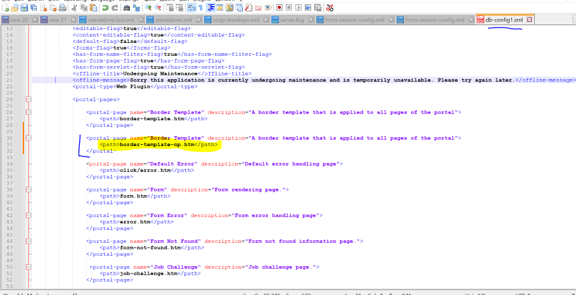
- Repackage and deploy the updated Salesforce WAR file into the JM server. Note: Do not deploy the WAR file through the JM UI, as it will not deploy correctly.
- Restart the JM service after deployment.
Verification
Access the Salesforce Form Space page again and confirm that the offline.htm page loads correctly without generating continuous error logs.