
This article provides guidance on how to modify a Groovy script in Temenos Journey Manager (TJM) when it appears as read-only.
Applicable To
- Product: Temenos Journey Manager (TJM)
- Module: Groovy Service Scripts
- Versions: Applicable to all versions supporting service archives
Use Case
Custom Groovy service scripts in TJM may sometimes appear as read-only. This prevents developers from modifying or debugging scripts directly in the system. The solution involves updating the service configuration to make the script editable.
Resolution
1. Export the Service Archive File.
2. Open the archive and locate the file: service-config.xml.
3. Find the 'groovyScript' service parameter and set the 'readOnlyFlag' value to 'false'.
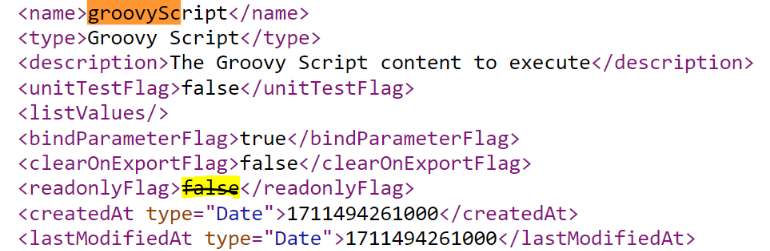
4. Save the changes and re-import the service archive into Journey Manager.
5. The Groovy script will now be available in edit mode.
Ensure that service archive modifications comply with organizational policies before re-import.